
Redmi Note 8 Pro Features & Specs in 2026
On this page 17 sections
Quick snapshot
If you’re checking redmi note 8 pro features in 2026, you are likely doing one of two things. You may be asking if the phone is still a smart budget buy. Or you may want better results from a phone you already own.
The short answer is yes, if you know what it does well. The redmi note 8 pro still has a strong mix of screen, camera, and battery value. It is older, but it can still work well for photos, media, and light to mid-level gaming.
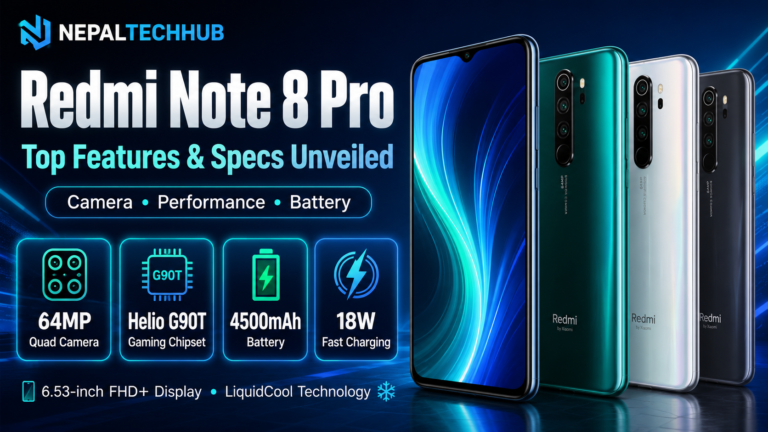
Among older redmi features, this model still stands out. The Xiaomi Redmi Note 8 Pro features many buyers still want are simple:
- Helio G90T chip for gaming
- 64MP quad camera
- 4500mAh battery with 18W charging
- 6.53-inch FHD+ screen
- NFC on some models only
That is why people still check the note 8 pro price before buying used or refurbished.
Note 8 Pro specs at a glance
These note 8 pro specs matter most in daily use:
- Display: 6.53-inch IPS LCD, FHD+ (2340×1080)
- Chip: MediaTek Helio G90T
- RAM and storage: often 6GB/64GB or 6GB/128GB
- Rear camera: 64MP main + 8MP ultrawide + 2MP macro + 2MP depth
- Front camera: 20MP
- Battery: 4500mAh
- Charging: 18W wired USB-C
- Audio: 3.5mm jack on most units
- Connection: Dual SIM, 4G LTE; Redmi Note 8 Pro NFC availability varies by region/model
- Software: MIUI on an older Android base
Redmi Note 8 Pro display quality
The Redmi Note 8 Pro display quality is still one of its best parts. The FHD+ panel looks sharp, and the size is good for video, reading, and games.
Simple ways to improve the screen today:
- Use a warmer color tone at night
- Turn on Reading mode in MIUI
- Keep brightness below max when you can
The limits are clear, too:
- It is IPS LCD, not OLED
- Blacks are not as deep
- Outdoor view is okay, but not top tier
Performance and gaming
The Helio G90T was built for gaming. Even now, it can handle many popular titles well if you tune the settings. People who search Helio G90T gaming benchmark usually want one thing: can it still keep up?
What to expect in 2026:
- Smooth play on medium settings for many games
- Lower shadows for heavy titles
- Capped frame rates if needed
- Lower resolution settings when games allow it
Quick way to cut stutter:
- Clear background apps
- Turn off auto-sync for apps you do not need
- Use Game Turbo
How to enable Game Turbo
If you have never set it up, learning how to enable Game Turbo can help the phone feel faster.
Steps in MIUI:
- Open Settings
- Go to Special features or Features
- Tap Game Turbo
- Add your games
- Open a game and use the Game Turbo side panel
Good changes inside Game Turbo:
- Choose performance mode if you have it
- Block alerts while you play
- Limit background apps
- Turn on touch response boosts
This will not make the phone new. But it can make play feel more even.
Redmi camera quality
Camera is still one of the biggest reasons people keep this phone. Overall redmi camera quality is strong in daylight, fair indoors, and fine for social posts.
In bright light, the 64MP main camera can capture fine detail, rich color, and solid HDR.
For better shots:
- Use HDR Auto in mixed light
- Tap to focus and lower exposure a little in bright scenes
- Keep the lens clean
64MP sample photos
When people search 64MP quad camera sample photos, they usually want sharp shots without too much noise or soft blur.
Try this:
- Use 64MP mode only in strong light and with a steady hand
- For daily shots, use the default mode
- Do not use digital zoom if you can step closer instead
- Use the ultrawide in good light, since it can get noisy
4K video
Yes, the phone can record 4K video. That answers the common question about does Redmi Note 8 Pro support 4K video.
In practice:
- 4K looks best in bright light
- It can add heat and drain the battery faster
- Video steadiness may drop depending on mode and settings
For normal clips, 1080p at a steady frame rate is often better. Save 4K for scenic shots when you can keep the phone still.
Redmi battery life
A big reason people still like this phone is redmi battery life. The 4500mAh battery was strong when the phone was new, and it can still last well if the battery health is good.
What most users can expect now:
- Light use: a full day
- Heavy gaming or video: likely needs a top-up
Simple battery tips
To improve Redmi Note 8 Pro battery life:
- Use a dark wallpaper, even though the screen is LCD
- Lower screen timeout
- Turn off GPS and Bluetooth scanning when you do not need them
- Limit power-hungry apps in MIUI Battery settings
- Keep storage from getting too full
18W charging support
The phone has 18W fast charging support, which helps with quick top-ups.
For better long-term health:
- Do not charge while gaming
- Keep it near 20% to 80% when possible
- Use a good cable and adapter
Software and app support
Many owners still mention the MIUI 12 update for Note 8 Pro because it changed the look and added a few controls. If your unit is on MIUI 12, or you are buying one with that version, check:
- Region ROM
- Carrier build
- Whether later MIUI updates arrived
Before you buy used, check app support and security update status. Also make sure your banking and work apps still run well.
Redmi Note 8 Pro NFC availability
Redmi Note 8 Pro NFC availability is not the same in every market. Some models have NFC. Some do not.
Before you buy:
- Check the exact model number and region
- Ask the seller to confirm NFC in Settings > Connection & sharing
- Do not assume tap-to-pay will work
Fix Redmi Note 8 Pro overheating
Heat is a common complaint, especially during gaming, 4K video, or fast charging. If you want to fix Redmi Note 8 Pro overheating, start with the easy wins.
Common causes:
- Gaming while charging
- High brightness in warm places
- Background apps (social/video) always syncing
- Thick cases that trap heat
- An old battery
Quick fixes:
- Stop charging while gaming
- Take off the case during long sessions
- Lower brightness and turn off boost features
- Use lower in-game graphics
- Restart the phone
- Update apps, since some versions use too much power
If heat stays high even during light use, check battery health. A swollen battery means stop using the phone and replace it right away.
Note 8 Pro price and buying tips
Because it is an older model, note 8 pro price changes a lot. It depends on storage, RAM, body condition, battery health, warranty, accessories, and NFC support.
Smart checks before buying used:
- Test the USB-C port
- Check camera focus and lens clarity
- Test speakers, mic, and fingerprint reader
- Run a 10-15 minute game or stress test
- Make sure there are no random restarts or ghost touches
Pros and cons
Pros
- Good value for daily use and media
- Strong daylight photos and useful camera range
- Solid redmi battery life with 18W fast charging support
- Big, sharp screen for the price
- Gaming is still fine with tuning and Game Turbo
Cons
- Older software and support path
- IPS LCD, not OLED
- Can heat up in heavy gaming or 4K video
- NFC is not in every version
- Old batteries can cut battery life and speed
Redmi Note 8 Pro vs Note 9
The Redmi Note 8 Pro vs Note 9 choice depends on what matters most.
Pick the Note 8 Pro if you want:
- a stronger feel for gaming on the right variant
- a camera setup you already like
Pick the Note 9 if you want:
- a newer feel in some versions
- better odds of finding a fresh battery or newer unit
Since Note 9 has several versions, compare the chip, camera, and NFC before you decide.
Redmi Note 8 Pro alternatives 2026
If you like the idea but want something newer, look for Redmi Note 8 Pro alternatives 2026 with:
- a more efficient chip
- better camera processing at night
- a longer security update path
- an AMOLED screen if your budget allows it
When you shop, focus on battery health, warranty, NFC if you need payments, and support for your key apps.
Takeaway
The redmi note 8 pro features list still holds up for a budget phone. The camera range, big FHD+ screen, and solid daily use still make sense in 2026.
The redmi note 8 pro specifications still offer good value if you buy smart.
If you buy one, check NFC, battery health, heat, and software status. With the right setup, the redmi note 8 pro can still offer good value.
Q&A
Is the Redmi Note 8 Pro still a good buy in 2026 for budget users?
Yes, if you understand its limits. It is still strong for media, daylight photos, and tuned gaming because of the Helio G90T, 64MP camera, big FHD+ screen, and 4500mAh battery with 18W charging. Check NFC, battery health, software, and heat before you buy used or refurbished.
How can I get the best gaming performance from the Helio G90T?
Use medium settings in most games and turn on Game Turbo. Add your games in Settings > Special features > Game Turbo. Then choose performance mode, block alerts, limit background apps, and boost touch response. Lower shadows, cap frame rates, clear background apps, and avoid gaming while charging to cut heat.
What camera settings give the sharpest results?
Use 64MP mode only in strong light with a steady hand. For most shots, use the default mode for cleaner processing. Keep HDR on Auto in mixed light, tap to focus, lower exposure a little in bright scenes, avoid digital zoom, and keep the lens clean. Use the ultrawide in good light only.
Does the Redmi Note 8 Pro support 4K video, and when should I use it?
Yes, it records 4K video. It works best in bright daylight, but it can add heat and battery drain. Video steadiness may also drop in some modes. For daily clips, 1080p at a steady frame rate is usually better. Save 4K for scenic shots when you can keep the phone still.
What are the best ways to extend battery life and reduce heat?
Keep brightness in check, use Reading mode, and cut background work. In MIUI
attery settings, limit power-hungry apps, lower screen timeout, and turn off GPS and Bluetooth scanning when you do not need them. Avoid charging while gaming, remove thick cases during long sessions, update apps, and consider a factory reset if heat keeps coming back. If light-use heat does not stop, check battery health and replace a swollen or worn battery right away.
Continue researching cameras
Move from editorial context into recorded Nepal prices, buying guides and comparison tools.


Be the first to share your thoughts!
No comments yet. Your thoughts matter.